Choosing the right POS software is one of the most important decisions for any business. Whether you run a retail store, pharmacy, restaurant, fashion outlet, or wholesale business, your POS system plays a vital role in your daily operations.
Today, businesses generally choose between two types of POS systems: Cloud POS and Desktop POS. Both have their own advantages, but the best choice depends on your business needs, budget, and future growth plans.
In this guide, we'll explain the differences to help you make the right decision.
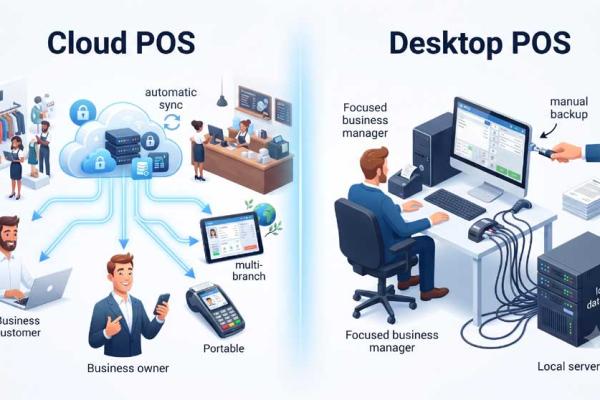
A Cloud POS is a web-based POS system where your business data is stored securely on cloud servers instead of your local computer.
You can access your business from anywhere using a computer, tablet, or smartphone with an internet connection.
A Desktop POS is installed directly on a local computer and stores business data on that device or a local server.
It is commonly used in businesses that prefer managing everything on their own hardware.
| Feature | Cloud POS | Desktop POS |
|---|---|---|
| Access Anywhere | ✅ Yes | ❌ No |
| Automatic Backup | ✅ Yes | ❌ Manual |
| Automatic Updates | ✅ Yes | ❌ Manual |
| Multi-Branch Management | ✅ Excellent | ⚠️ Limited |
| Mobile Access | ✅ Yes | ❌ Limited |
| Data Security | ✅ High | Depends on Local Security |
| Initial Setup Cost | ✅ Low | Higher |
| Maintenance | ✅ Managed by Provider | Self Managed |
| Scalability | ✅ Excellent | Limited |
Cloud POS is ideal for:
Desktop POS may be suitable if:
Modern businesses require flexibility and real-time information.
Business owners want to:
Cloud POS makes all of these possible.
Nextill POS is a cloud-based business management platform designed for businesses of all sizes.
It includes:
With Nextill POS, you can manage your business securely from anywhere.
If your business is growing or you want the flexibility to manage operations from anywhere, a Cloud POS is the better long-term investment.
While Desktop POS may suit some businesses with basic requirements, Cloud POS offers greater convenience, security, automatic updates, and easier scalability.
For businesses looking for a modern, reliable, and future-ready solution, NexTill POS provides everything you need in one cloud-based platform.