Best POS Software for Small Businesses in 2026: A Complete Buying Guide

Best POS Software for Small Businesses in 2026: A Complete Buying Guide

Running a Small Business is Challenging

Whether you own a grocery store, pharmacy, clothing shop, electronics store, restaurant, or wholesale business, managing daily operations can quickly become overwhelming.

Many small businesses still rely on notebooks, Excel spreadsheets, or separate software for sales, inventory, and accounting. While this may work initially, it often leads to problems as the business grows.

Common challenges include:

  • Slow billing process
  • Inventory shortages or overstock
  • Incorrect financial records
  • Difficulty tracking employee performance
  • Delayed business decisions
  • Poor customer management

This is where a modern POS (Point of Sale) system becomes essential.


What is a POS Software?

POS (Point of Sale) software is an all-in-one business management system that helps you manage sales, inventory, purchases, accounting, customers, employees, and reports from a single platform.

Instead of using multiple applications, everything is available in one dashboard.


Why Every Small Business Needs POS Software

A POS system is no longer just for large companies.

Today, even small businesses can benefit from automation.

With the right POS software, you can:

  • Process sales faster
  • Reduce manual errors
  • Track inventory in real time
  • Monitor profits and expenses
  • Manage customers and suppliers
  • Generate detailed reports
  • Save time and operating costs

Features to Look for in the Best POS Software

1. Fast Sales & Billing

A good POS system should make billing simple and fast.

Look for features like:

  • Barcode scanning
  • Quick invoice generation
  • Multiple payment methods
  • Discount management
  • Returns and exchanges

2. Inventory Management

Inventory is the heart of every business.

Your POS should help you:

  • Monitor stock levels
  • Receive low-stock alerts
  • Track product batches
  • Manage expiry dates
  • Handle multiple product variants

3. Purchase Management

The software should allow you to:

  • Create purchase orders
  • Manage suppliers
  • Record purchases
  • Automatically update inventory

4. Accounting & Finance

Instead of using separate accounting software, choose a POS that includes:

  • Income tracking
  • Expense management
  • Profit & Loss
  • Cash flow
  • Due payments
  • Ledger reports

5. Customer Management

A modern POS should help you build better customer relationships.

Features include:

  • Customer database
  • Purchase history
  • Loyalty programs
  • Credit management

6. Employee Management

Monitor:

  • Attendance
  • Payroll
  • Performance
  • Sales commissions

7. Business Reports

Real-time reports help you make smarter decisions.

Important reports include:

  • Daily Sales
  • Monthly Sales
  • Product Performance
  • Stock Reports
  • Profit Reports
  • Expense Reports

8. AI Assistant

Modern businesses are using Artificial Intelligence to improve productivity.

An AI Assistant can help you:

  • Understand reports
  • Analyze sales trends
  • Forecast inventory needs
  • Answer business questions
  • Improve decision-making

Which Businesses Need POS Software?

POS software is perfect for:

  • Retail Stores
  • Grocery Shops
  • Supermarkets
  • Pharmacies
  • Restaurants
  • Fashion Stores
  • Electronics Shops
  • Mobile Shops
  • Cosmetic Stores
  • Wholesale Businesses

Why Choose NexTill POS?

NexTill POS is more than just billing software.

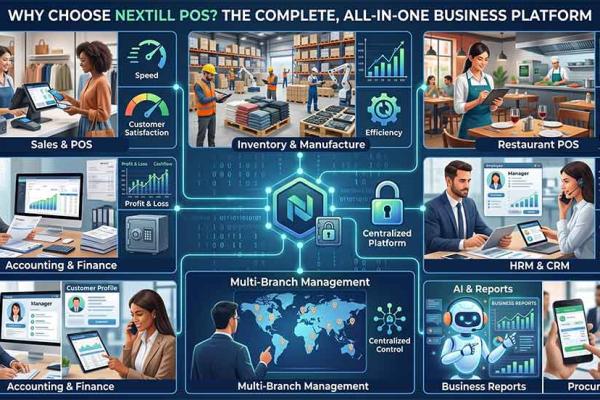
It combines:

  • Sales & POS
  • Inventory Management
  • Purchase Management
  • Accounting & Finance
  • HRM
  • CRM
  • Reports
  • WhatsApp Automation
  • AI Assistant
  • Manufacturing
  • Restaurant POS
  • Multi-Branch Management

Everything your business needs is available in one secure platform.


Final Thoughts

Choosing the right POS software is one of the smartest investments for any small business.

A reliable POS system saves time, reduces mistakes, improves customer service, and helps your business grow faster.

If you're looking for an affordable, powerful, and easy-to-use business management solution, NexTill POS is the perfect choice.


Frequently Asked Questions

Which POS software is best for small businesses?

Choose a POS that includes sales, inventory, accounting, reports, customer management, and AI features in one platform.

Is cloud POS better than desktop POS?

Cloud POS provides remote access, automatic backups, and easier scalability, making it a popular choice for growing businesses.

Can Nextill POS manage multiple stores?

Yes. NexTill POS allows you to manage multiple stores, warehouses, and showrooms from a single dashboard.
Menu